21/10/2026 14:47
Base Before Rim? YouTube Playlist Ordering for Cambodian Basket-Weaving Workshops

A beautiful basket-finishing video can attract attention while leaving a beginner unable to start. If your workshop’s lessons appear in the order you filmed them, viewers may encounter the rim before the base, or a decorative variation before learning the underlying technique. For Cambodian craft businesses using YouTube to introduce classes or explain materials, lesson order is part of the offer. This guide shows how to build and check a practical viewing sequence, connect it to an honest promotional message, and decide whether an SMM service has any relevant role. The workshop examples are hypothetical, and no sales or learning results are assumed.
1. Define the task the playlist should help someone finish
Begin with one learner and one project. In a hypothetical Battambang workshop, the intended viewer is an adult beginner who wants to understand how a small practice basket takes shape before asking about a class. The playlist should explain preparation, the base, the sides and the rim. It does not need to contain every video the workshop has ever made. Choosing a narrow purpose makes missing explanations easier to notice.
Write a working sentence: “After watching this sequence, someone should understand the stages of our beginner basket project and know what to ask before attending.” That is a useful editorial objective because the team can check whether the lessons support it. Avoid promising that everyone will finish a basket independently. Available materials, prior experience and the amount of practical guidance needed can differ. A viewing sequence can prepare learners without replacing instruction.
2. Map prerequisites before touching the playlist
Make a simple lesson map using the videos you already have. For each video, record its subject, the project shown, what viewers must understand beforehand and the visible state of the basket when the lesson ends. A side-weaving demonstration that starts with a completed base belongs after a suitable base lesson. If the earlier video uses a different project, check whether the transition still makes sense.
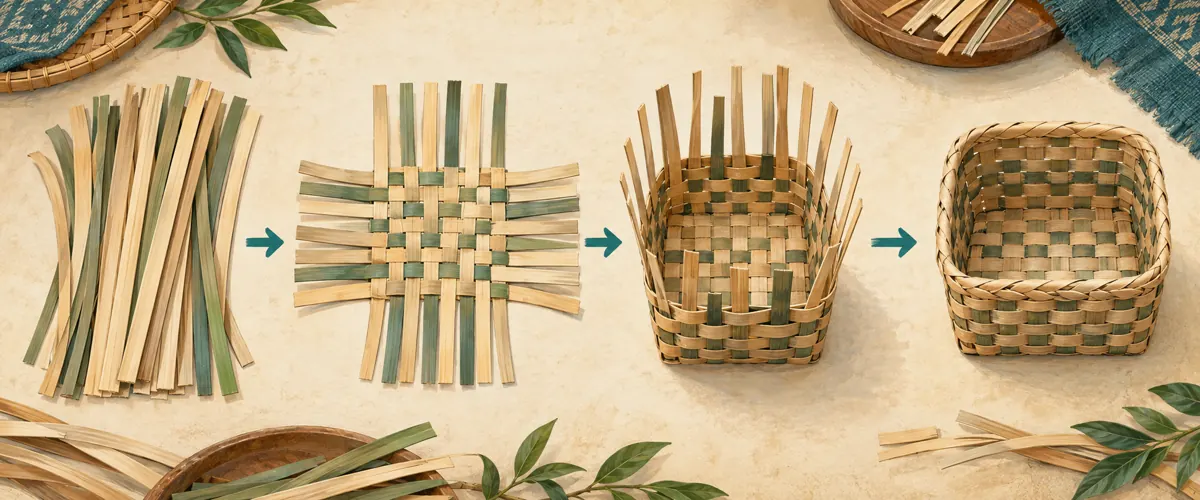
For the hypothetical workshop, four working labels might be “Prepare the materials,” “Form the base,” “Raise the sides” and “Finish the rim.” These are planning labels, not a claim that four lessons always suffice. If a necessary transition is absent, film that explanation or state the limitation clearly. Rearranging existing videos cannot supply missing instruction. Keep decorative alternatives and advanced variations outside the beginner sequence until their prerequisites are covered.
3. Choose instructional order over upload order
The newest video is not automatically the best starting point. A workshop may have filmed its attractive finished basket first, then recorded preparation after customers asked questions. For this type of series, order videos by what the viewer needs next. A finished example can appear briefly at the beginning of the first lesson, but a separate promotional montage should not interrupt the practical progression.
Review each handoff by comparing the final explanation of one lesson with the opening of the next. Does the basket suddenly change shape? Are new strips already attached? Does the instructor introduce a term that has never been explained? Record these gaps before promotion. Sometimes the correct repair is a short bridging explanation; sometimes the following video belongs to another project entirely. The purpose of ordering is continuity, not simply making the list look tidy.
4. Save the order in the playlist itself
YouTube’s desktop guidance says to open a playlist and drag videos up or down to reorder them. It separately describes dragging within the watch-page playlist panel as a temporary change. Reordering is not available for playlists containing only Shorts. Use the playlist itself for this workflow, then reopen it to check the result. [YouTube playlist guidance](https://support.google.com/youtube/answer/57792?hl=en).
Keep your written lesson map beside the screen while arranging the videos. Match each entry by its actual content, especially when several thumbnails show similar baskets. Once the list matches the map, leave the editing view and open the intended viewing destination again. This second pass catches a misplaced variation or a change that existed only in the current playback session. If the arrangement is wrong, correct it before sharing the promotional post.
5. Make every lesson recognizable on its own
Viewers may arrive at the middle lesson through a message from a friend. Give each video a descriptive title that identifies both the stage and the project. In the hypothetical series, “Practice Basket: Raising the Sides” tells a newcomer more than “Part Three.” A sequence number can help, but it should support a meaningful title. Otherwise, someone who arrives outside the playlist has little context.
Keep the project name and material terminology consistent across the series. For a workshop teaching mainly in Khmer, review the actual lesson wording with a fluent speaker and retain the terms learners use. English model names or material labels should not drift between videos. Also check the thumbnails together: each should reveal a different stage instead of showing the same completed basket. These choices help people identify where they are without implying any ranking benefit.
6. Test the exact destination your promotion will share
Copy the destination you intend to place in the promotional message and test that exact link on a phone. Do not assume that a link copied while watching a middle lesson introduces the whole course in the way you intended. Look at the opening screen, identify the starting lesson and check whether the surrounding sequence is clear. Repeat the test from a separate viewing context so your editing session does not conceal a problem.
Ask a colleague to follow the link without explaining the intended route first. Give them a specific task: find the preparation lesson, identify the next stage and locate the workshop’s enquiry instructions. Record where they hesitate. This is a small usability check, not evidence of market demand. If they cannot find the beginning, repair the destination or the accompanying message before spending time distributing it more widely.
7. Match the promotional promise to the lessons
Describe what the sequence actually contains. A hypothetical promotional message could say: “See the stages of our beginner basket project, from prepared strips to the finished rim. Start with the materials lesson, then contact us about the next workshop.” That wording introduces the resource and gives an optional next action. It does not promise mastery, available seats or a material package unless those details have been confirmed.
For Cambodian readers, practical context can matter more than elaborate promotional language. Specify the teaching language, workshop location and whether enquiries concern a class, materials or a finished product. Keep changing booking details in a maintained destination rather than scattering different versions across old lesson descriptions. Share where the resource is relevant and permitted, such as an existing conversation about learning the craft. Avoid repeatedly posting the link into unrelated discussions.

8. Assess SMM services against the actual problem
The supplied moha-smm.com catalogue includes “YouTube Like ~ Max 5k ~ 5k/days ~ Instant ~ 𝗥𝗘𝗙𝗜𝗟𝗟 30D”. The title identifies a likes service, but its description is empty. Its speed, maximum and refill wording are catalogue claims, not independently verified delivery terms. Nothing in the supplied description establishes Cambodian viewers, interested learners or workshop bookings. A likes service also cannot fix a missing preparation lesson or an incorrect playlist order.
YouTube prohibits artificial increases in engagement and warns that a hired promoter’s methods can affect the channel. Review the actual method before commissioning promotion; do not proceed with artificial metric inflation. [YouTube fake engagement policy](https://support.google.com/youtube/answer/3399767?hl=en). Purchased engagement is not evidence of genuine interest, sales, ad delivery or Cambodian users. For this workflow, prioritise a complete lesson sequence and relevant voluntary sharing. Declining an unsuitable service is a valid outcome of an SMM panel review.
9. Use learner questions to diagnose the next improvement
After sharing, collect concrete questions with the relevant lesson name. “Which strips are ready to use?” points toward preparation. “How did the corners become upright?” suggests a transition gap. “Where is the class held?” concerns the enquiry information. Keep these categories separate so that a booking question does not trigger an unnecessary video edit, and a teaching gap does not get dismissed as a promotion problem.
In a hypothetical review, an instructor might notice that several people ask about the move from base to sides. That is a reason to inspect the handoff, not proof that reordering alone will solve it. Ask what they could not follow, review the relevant footage and make one justified change. Keep an enquiry record separate from the content notes, and count a booking only when the workshop’s normal confirmation process has actually been completed.
10. Maintain the sequence when the project changes
Assign one person to review the playlist whenever a lesson is added or revised. Their job is to compare the new material with the existing project and prerequisites. A new rim technique might belong in an advanced variation rather than replacing the beginner finish. If the workshop changes materials, inspect the whole sequence for incompatible assumptions instead of updating only the first title.
Common mistakes include putting the most visually impressive lesson first, mixing different basket projects, relying on vague part numbers and treating a higher engagement count as proof that the teaching works. Another is adding every new upload to the beginner list simply because it concerns weaving. Keep a short change note explaining what moved and why. Before the next promotional push, repeat the phone check and confirm that the public promise still matches the lessons.

Frequently asked questions
Should the most popular basket video lead the playlist?
Only if it is also the right starting lesson. Popularity does not establish that a video explains the prerequisites. A finished-basket showcase can be useful in a separate promotional message, while the beginner sequence starts with preparation. Choose the first lesson by what a newcomer needs to understand.
Do we need to film the entire course again?
First inspect the existing lessons and their handoffs. If the same project is shown consistently, rearrangement and clearer titles may be enough. If a necessary action happens off camera, add an explanation that genuinely covers it. Do not label an incomplete sequence as a complete course merely because the playlist looks organised.
What if someone only wants the rim lesson?
Let the lesson remain useful independently. Identify the basket project and the preparation it assumes, then point viewers toward the earlier explanation when needed. An experienced viewer may reasonably skip ahead. The recommended order should help beginners without suggesting that every visitor must watch every video.
How can we tell whether the new order helped?
Use specific observations: whether a test viewer finds the start, whether adjacent lessons connect clearly and what questions arrive afterward. These observations can guide improvements, but they do not establish a guaranteed causal result. If promotion, titles and teaching footage changed together, avoid attributing every later enquiry to playlist order alone.
Can a panel order demonstrate demand for a workshop?
No. A service record documents a transaction or claimed delivery, not willingness to attend. Genuine enquiries still need clarification about location, language, timing and suitability. Confirmed bookings require your ordinary booking process. Keep those records distinct, and do not use purchased engagement as customer proof in promotional material.
Explore the current service catalogue, create an account, or ask a specific question through support tickets.
Prepared with AI assistance. Illustrations explain the workflow and do not represent customer results.