19/10/2026 18:43
Which Finish Is Still Available? A Telegram Photo Audit for Cambodian Woodworking Shops

An attractive cabinet photo can keep generating questions long after the workshop stops offering its finish. For a Cambodian woodworking business, promoting a Telegram channel without reviewing those older images can create avoidable confusion: shoppers find a design they like, but staff cannot supply what the picture appears to promise. A focused photo audit helps connect the shop’s visual history with its current offer. This workflow uses Telegram’s shared media tools to locate older photographs, then applies a practical workshop review before choosing anything to promote. The aim is a channel that helps customers ask useful questions about furniture the business can actually discuss and quote.
1. Start with one furniture category and one customer question
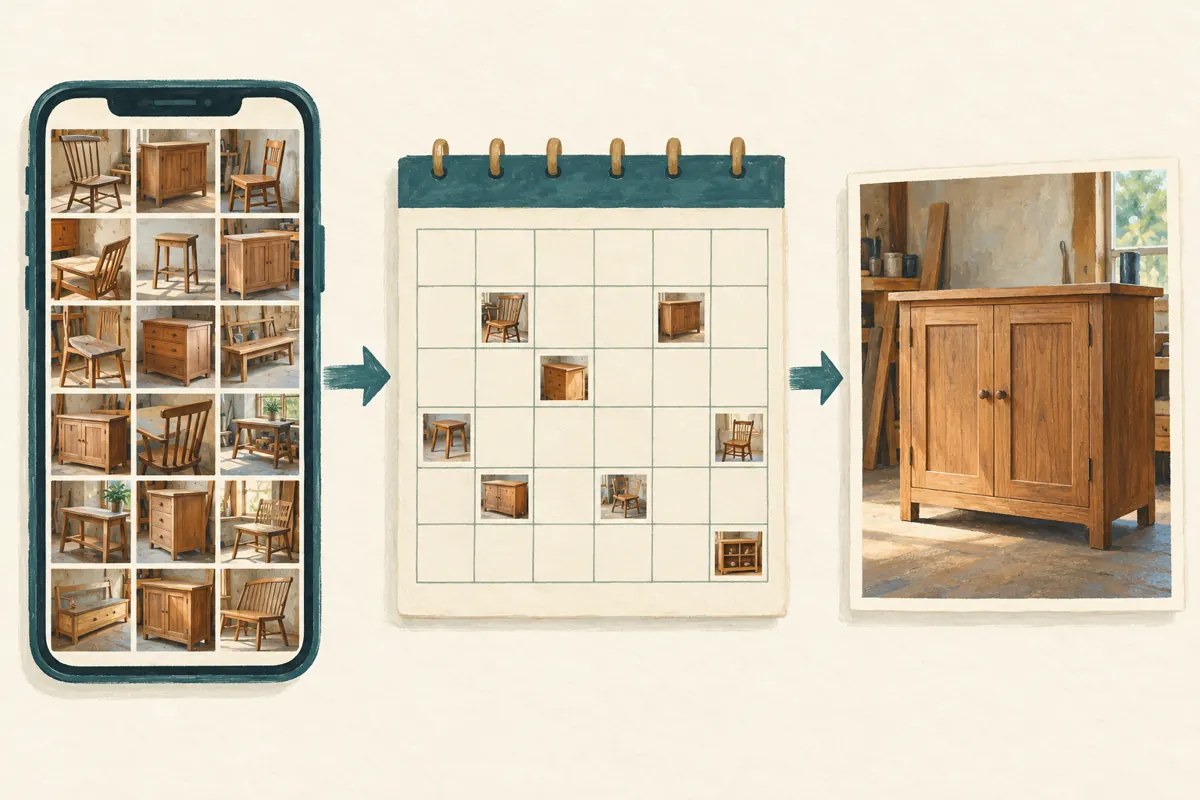
Consider a hypothetical Phnom Penh workshop preparing to promote made-to-order storage cabinets. Its channel contains completed commissions, sample doors and photographs taken under different lighting. A shopper might reasonably ask, “Can I order this cabinet in the finish shown?” That question defines the audit. The owner reviews cabinet photographs first, rather than attempting to reorganize every chair, table and repair image in the channel. This keeps the task small enough to finish before the promotion begins.
Write down what the audit must establish: whether the pictured finish can still be offered, whether the design remains practical to produce, and what staff need before preparing a quote. Assign the workshop lead to confirm production details and the person managing Telegram to record the decisions. Neither should infer availability from an attractive photograph alone. If the shop also serves customers outside Phnom Penh, treat delivery feasibility as a separate confirmation rather than assuming every pictured item can travel anywhere.
2. Use shared media to review photographs by period
Telegram’s official shared media guide explains that tapping a chat header and scrolling down opens its media area. The guide describes a date bar, a calendar with daily media previews, and filters for photos, videos or both. Use the photo view to narrow the review, then inspect a relevant period through the calendar. Menu placement can differ across app versions, so confirm the controls on the device your staff actually use.
Choose periods connected to changes the workshop remembers, such as a new finish supplier or a different cabinet range. The calendar helps locate material posted around that time; it does not establish when furniture was manufactured or whether it remains available. Keep a simple review note containing the original post reference, the pictured item, its posting date and the person responsible for checking it. Review videos separately if they show finishes that the photographs do not capture clearly.
3. Read the original post before judging the thumbnail
A thumbnail removes much of the information that makes a furniture photograph understandable. The original caption might describe a completed custom commission, a sample under development or a piece awaiting collection. Open the selected photograph and review its original message context before treating it as an offer. Record exactly what the shop claimed at the time. A photo labelled as previous work needs a different decision from one that explicitly invites orders for the pictured specification.
Look for details that could become misleading when the image is reused: a temporary price, an old delivery arrangement, handles that are no longer available or a size made for one customer’s room. Do not carry those details into a new promotion without checking them. Also check whether permission to show a completed installation still covers the intended reuse, particularly if the photograph includes a customer’s home. The audit should produce a reliable shortlist, not simply a folder of attractive images.
4. Compare the image with a real sample and workshop records
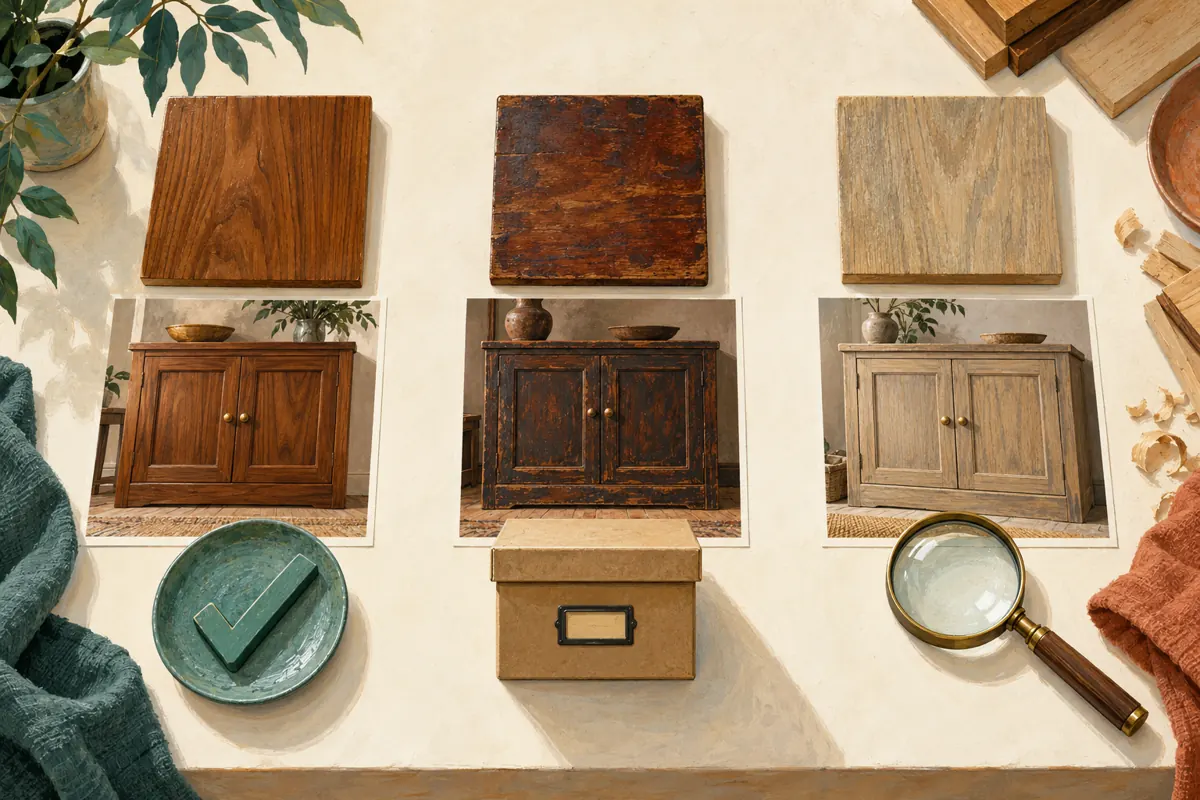
Ask the workshop lead to identify the material and finishing process from production records or a retained sample. Colour alone is a weak identifier: lighting, camera processing and the customer’s screen can change how a finish appears. Place the current physical sample beside the old photograph, but use that comparison to identify questions rather than declare an exact match. Confirm whether the same materials and process remain available and whether a new sample needs approval.
In the hypothetical workshop, a dark cabinet photograph might resemble a finish still on display while actually showing an earlier coating over different timber. The correct next step is to verify the specification, not rename the old image after the nearest current sample. Record any uncertainty explicitly. If the workshop can offer only a similar appearance, say so when discussing the order. A photograph can introduce a style, while a physical sample and agreed specification establish what the customer is choosing.
5. Give each photograph a clear editorial status
Use three statuses in the review record: current, historical and unverified. Current means the workshop has checked the pictured option and can discuss supplying it under stated conditions. Historical means the image remains useful as an example of previous workmanship, but should not imply present availability. Unverified means someone still needs to establish an important detail. These are your own editorial labels, not Telegram settings or automatic inventory categories.
A historical photograph does not automatically need deletion. It may demonstrate joinery or a layout that customers can adapt. However, its context should make the limitation clear wherever the shop uses it. Keep unverified images out of the promotion shortlist until the missing information is resolved. If removing a channel message is necessary, review the consequences first: Telegram’s Channels FAQ says a deleted channel message disappears for subscribers. Save any business record you legitimately need before making that decision, and avoid unnecessary removal of useful portfolio material.
6. Build a current offer around the verified photographs
Choose photographs that answer different buying questions: the cabinet’s overall shape, a close view of the finish and a useful construction detail. Avoid filling the promotion with nearly identical angles. State whether the photographs show an available finished piece, a sample or previous work illustrating a made-to-order option. For Cambodian readers, use the language your customers understand and explain unfamiliar workshop terms. Include measurements with clear units rather than relying on visual scale.
A hypothetical caption could explain that the photograph shows a previous cabinet, that current finish samples are available to inspect, and that dimensions and delivery location are needed for a quotation. Add a clear next step, such as sending the chosen photo with the required width and intended location. Do not promise an exact completion date before checking the production schedule. If the image is only a style reference, make that fact visible near the image instead of leaving staff to explain it after an enquiry.
7. Decide whether a panel service addresses the actual need
The supplied catalogue includes the exact service name “Telegram Post Share ~ Max 100k ~ 100k/day ~ Instant ~ 𝐍𝐎 𝗥𝗘𝗙𝗜𝗟𝗟”. Its name identifies a post-sharing offering, but the supplied description is empty. The wording does not independently establish delivery mechanics, audience location, timing or the quality of attention. Before considering it, obtain the current terms and determine whether the service fits the intended post and complies with applicable platform rules. Do not treat the title as verified evidence of its claims.
For this workshop, the business objective is to receive informed cabinet enquiries. Purchased engagement is not evidence of genuine interest, sales, ad delivery or Cambodian users. If the main problem is that visitors cannot distinguish current finishes from old commissions, a panel order will not resolve it. Improve that information first. If a service is later used, keep its delivery record separate from customer conversations and quotations, and never present purchased activity as proof that a finish is popular with local buyers.
8. Test the customer journey before promoting the channel
Ask a colleague unfamiliar with the selected cabinet to review the proposed promotion as a customer would. Give them a practical task: identify the finish, determine whether it is currently offered and find out what to send for a quote. Their difficulty is useful evidence about the content. If they choose an old image by mistake, inspect the surrounding channel material and make the distinction between portfolio examples and current options easier to understand.
Telegram’s Channels FAQ says new subscribers can see the channel’s message history. That makes older photographs relevant even when the latest promotional post is accurate. Review likely points of confusion rather than assuming visitors will read only the newest message. Share the checked promotion through appropriate existing business channels and with people who have asked for information. Telegram also cautions against unsolicited messages to strangers. Choose distribution that reaches a relevant audience without turning the launch into an unwanted messaging campaign.
9. Turn a photo enquiry into a usable specification
When a customer sends an old image, begin by acknowledging the feature they like. Ask whether they mean the colour, door pattern, overall dimensions or another detail. Then explain the image’s status using the audit record. A historical finish may still lead to a useful conversation if the customer mainly wants the cabinet layout. Avoid replying with a general “available” before establishing which part of the photograph they expect the workshop to reproduce.
For example, a hypothetical reply could say: “That photograph shows a previous commission. We can discuss this cabinet layout, and we have current finish samples to compare. Please send the width you need and your delivery area.” Continue with the practical details needed for a quote, including access constraints where relevant. Keep the proposed finish identifiable throughout the conversation. Before accepting an order, confirm the agreed sample or specification through the shop’s normal process rather than relying on a customer’s screenshot as the complete instruction.
10. Review misunderstandings and update the shortlist
After the promotion, record the questions that required clarification. Did customers mistake portfolio images for ready stock? Did they understand that the finish needed confirmation? Were enquiries missing dimensions or delivery information? These observations help identify the next content improvement. Keep the record proportionate: an image reference, the misunderstanding and the corrective action are usually more useful than copying entire customer conversations into a marketing spreadsheet.
Avoid judging the audit through a rising post counter alone. Telegram says channel view counts are approximate and include views of forwarded copies; they are not a count of qualified buyers. Review actual enquiries and quotation progress separately, without attributing every change to the promotion. Revisit the photo shortlist when materials, finish options or production capabilities change. Common mistakes include treating a recent upload as current stock, assuming similar colours mean identical specifications, and using a high engagement count to justify promoting an option nobody has checked.
Frequently asked questions
Does the Telegram media calendar show when a cabinet was made?
No. Use it to locate media associated with a posting date, then check the workshop’s records for manufacturing details. A recently posted photograph may show an older commission. Record the posting date and any verified production date separately so staff do not mistake publication timing for current stock.
Should we remove every photograph of an unavailable finish?
Not necessarily. A clearly identified historical example can still explain craftsmanship or design possibilities. Remove it from the current promotion shortlist and review whether its public context could mislead shoppers. If an image cannot be presented accurately or no longer has appropriate permission, consider removal after checking your recordkeeping needs.
What if staff cannot identify the finish in an old photograph?
Mark it unverified and assign someone to investigate. Do not guess from colour or give it the name of a similar sample. If the specification remains unknown, use a newly photographed, verified sample for the promotion. You can discuss the old image as inspiration while explaining that its exact finish is unconfirmed.
Can purchased Telegram shares show which finish Cambodian customers prefer?
No. A purchased sharing service cannot establish local preference, qualified demand or willingness to buy. Ask genuine enquirers which feature interests them and record their answers without claiming the responses represent the whole market. Keep those observations separate from purchased delivery and from the channel’s public engagement counters.
Can a small workshop complete this without specialist software?
Yes. A simple written list or spreadsheet can hold the image reference, product description, status, reviewer and next action. Start with the photographs most relevant to the planned promotion. The important work is confirming the specification and making its status clear; a more elaborate system cannot replace that decision.
Explore the current service catalogue, create an account, or ask a specific question through support tickets.
- Telegram: Hyper-Speed Scrolling and Calendar View for Shared Media, Join Requests, Global Chat Themes on iOS and More
- Telegram Channels FAQ
Prepared with AI assistance. Illustrations explain the workflow and do not represent customer results.